
With Sirius Web 2026.9, we build on our efforts to make every modeling interaction more consistent, efficient, and predictable.
This release focuses on two complementary goals: providing a unified palette experience across diagrams and trees, and refining the small interactions that matter when editing complex diagrams. It also gives application builders more control over how tools are organized and presented to users.
- A unified palette experience, now including connector tools
- More ways to customize palettes in Sirius Web-based applications
- Faster group actions for selected diagram nodes
- More precise lasso selection and fewer accidental moves
- Numerous fixes for more predictable diagram editing
One Palette Experience Across Sirius Web
Over the last few releases, we have progressively redesigned the palette used in diagrams and introduced the same experience in the Explorer and other tree representations. Sirius Web 2026.9 takes another step toward a single, coherent way to discover and invoke tools.
The Explorer and Trees Now Share the Diagram Palette
The Explorer and other tree representations now use the same underlying palette component as diagrams.
While each palette remains tailored to its specific context, they now share common interaction patterns and presentation mechanisms, as well as some common features, such as the search bar. This provides users with a more consistent experience across tree items and diagram elements.
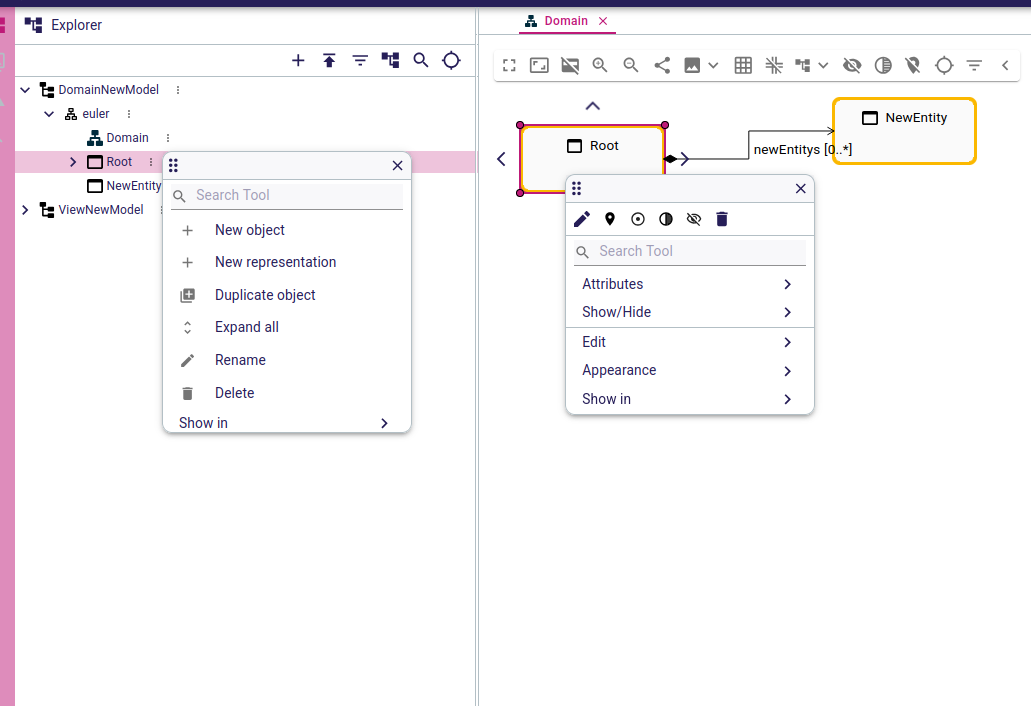
Connector Tools Now Use the Diagram Palette
When users create a connection between two diagram elements, the available connector tools are now displayed using the same palette component as other diagram tools.
This may look like a small visual change, but it makes the interaction more consistent: users benefit from the same organization and rendering wherever a tool is proposed. The connector popup and the palette now also follow the same lifecycle, making the whole interaction more predictable.
Better Search, Including Contributed Tools
The fuzzy search introduced in the redesigned palette now works more reliably with tools contributed or overridden by downstream applications. Matching text is highlighted consistently, and contributed tools are included in search results alongside tools defined in the View DSL.
For users working with tool-rich modeling environments, this means less time scanning long lists and greater confidence that the expected action will appear in the search results.
Palettes That Applications Can Truly Make Their Own
A modeling application often needs more than a generic list of actions. Tool availability, ordering, labels, and grouping may depend on the domain, the selected elements, or the workflow being supported.
Sirius Web 2026.9 introduces dedicated palette customizers for the main interaction contexts:
- tree item palettes
- diagram background and diagram element palettes
- connector palettes used while creating edges
Application builders can use these customizers to post-process the palette computed by Sirius Web before it reaches the user. This provides a consistent extension mechanism to reorganize, enrich, or filter tools without having to replace the complete palette infrastructure.
Tree palettes also move further toward a backend-driven architecture. Tool definitions, including their internationalized labels, can now be provided through one coherent palette. This makes diagram and tree interactions easier to align in domain-specific applications.
Faster Actions on Groups of Nodes
Multi-selection is most useful when users can immediately act on the whole selection. This release adds two practical capabilities to support this workflow.
Pin or Unpin Multiple Nodes at Once
Users can now pin or unpin all selected nodes directly from the group palette. Pinned nodes keep their position during automatic layout operations, so applying this action to a group makes it easier to preserve a carefully arranged part of a diagram before reorganizing the rest.
Remove Views Without Deleting Semantic Elements
Studio makers can now configure group palette actions that remove several unsynchronized nodes from a diagram without deleting the underlying semantic elements. The new diagramServices.deleteViews(nodes) AQL service makes this distinction explicit and easier to use in custom diagram tools.
This is particularly useful when a diagram is only one visual perspective on a model: users can clean up the view while keeping the modeled data available elsewhere.
More Precise Diagram Selection
Selecting the right elements in a dense, nested diagram should not require repeated attempts. Sirius Web 2026.9 refines lasso selection to better match user intent.
Users can now start a rectangle selection on a node without automatically selecting that node or its containers. This makes it much easier to select nested elements while leaving their parent containers unselected.
Several related fixes ensure that the last selected element remains correctly selected after a diagram refresh, after a tool changes the selection, or after users remove elements from a multi-selection.
Small pointer movements while clicking no longer trigger a node drag as easily. This reduces accidental displacement, especially when users are simply trying to select an element in a crowded diagram.
More Predictable Diagram Editing
This release also brings a series of focused fixes that improve the stability and visual quality of diagrams.
Free-form containers now behave more naturally when their children are moved or resized. The layout of child nodes is also preserved more reliably when their parent is resized.
Edge layout has received additional attention as well. Bending points on non-Manhattan edges are handled correctly during layout, and creation handles are more accurately centered relative to their nodes.
Other refinements address details that could interrupt the modeling flow: creation handles no longer remain highlighted after a connection, node decorators remain visible on hover, tree tooltips disappear when the palette opens, and tools can no longer be triggered using keyboard shortcuts on read-only diagrams.
Individually, these are targeted improvements. Together, they make editing feel more consistent and dependable, particularly on large diagrams where small inconsistencies quickly become distracting.
Looking Ahead
Sirius Web 2026.9 makes tool-driven interactions more coherent from the Explorer to the diagram canvas through to edge creation. It gives users more efficient group actions and more accurate selection, while giving application builders a clearer and more powerful way to customize palettes.
These changes continue a broader effort: reducing friction in everyday modeling without sacrificing the extensibility required by domain-specific applications.
The complete list of updates, bug fixes, and migration notes is available in the Sirius Web changelog.