
In this new release of SysON, we’ve focused on improving both the robustness and usability of the modeling experience. Discover the latest updates across the interface, graphical capabilities, import/export features, as well as the extended support for SysML v2 concepts.
- Bug Fixes and Stability Improvements
- Graphical Improvements
- Textual Import/Export Enhancements
- Model and Project Management Improvements
- Scalability and Customization Improvements
Bug Fixes and Stability Improvements
Several issues impacting model consistency and diagram behavior have been addressed:
- Elements are now placed in the correct compartment, even when they share a common type. For example,
ViewUsageelements no longer appear in the parts compartment due to their inheritance fromPartUsage. - It is now possible to redefine a
PartUsagewith the same name as the usage it redefines. SatisfyRequirementUsagecould be created with an invalid target (i.e., not aRequirementUsage) via the graphical edge tool.- Creating a
RequirementUsagefrom aPackagenode now properly reveals the element. - Multiplicity handling has been improved:
- You can now remove multiplicity using direct edit.
- Typing [] during edit correctly removes existing multiplicity.
- The New Flow tool between parameters now works as expected.
- Drag and drop from the Explorer now provides feedback when elements are already displayed in the diagram:

- The Add existing elements tool in the action flow compartment of
ActionUsagenodes, now correctly adds elements only inside the action. Req IdandDeclared Short Nameproperties forRequirementare now synchronized to comply with the SysMLv2 specification.
Graphical Improvements
Several visual and diagram interaction enhancements have been introduced:
- Improved connection routing, especially around ports and parameters, for clearer and more readable diagrams.
- Added new compartments across multiple node types:
AllocationDefinition: ends and parts compartments.ConnectionDefinition: attributes, ends, documentation, and parts compartments.PartDefinition,AllocationDefinition,InterfaceDefinition: parts compartments.
Subjectscan now be displayed as graphical nodes (in addition to compartments) forCase,UseCase,Requirement,SatisfyRequirementusages and definitions.- Added support for nested attributes: Become nested Attribute and Add as nested Attribute for
AttributeUsage. - Newly created
AllocationDefinitionandConnectionDefinitionnodes now include two default ends:- source and target
- Additional ends can be added via New end tool (replacing “New Part as end”)
PerformActionUsageelements now follow consistent display rules:- If a compatible compartment is visible, they appear inside it.
- Otherwise, they are placed in the diagram background.
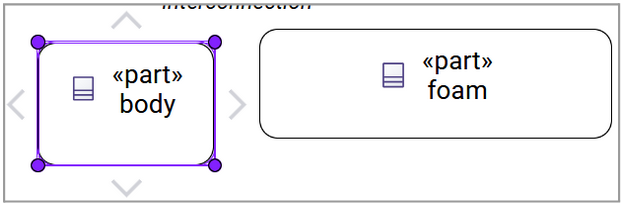
- You can now resize elements smaller than before, offering more flexibility in diagram layout :
Textual Import/Export Enhancements
Significant improvements have been made to ensure accurate and reliable textual transformations:
- Better handling of special characters:
- Apostrophes in exposed element names are now properly escaped
LiteralStringwithout value is correctly exported- Backslashes in
LiteralStringare now handled properly
- Import improvements:
SendActionUsagepayload arguments are now correctly resolved within TransitionUsage- Unnamed redefined
FeaturesinFeatureChainare now properly handled
- Extended textual export support:
StateUsageandStateDefinitionTransitionUsageExhibitStateUsageAllocationUsageandAllocationDefinition
Model and Project Management Improvements
Several improvements have been introduced to simplify model and project handling:
- The
.sysmlextension is now automatically added when creating models. - Modifying a user library no longer moves it to the project root, it remains in the User Libraries section.
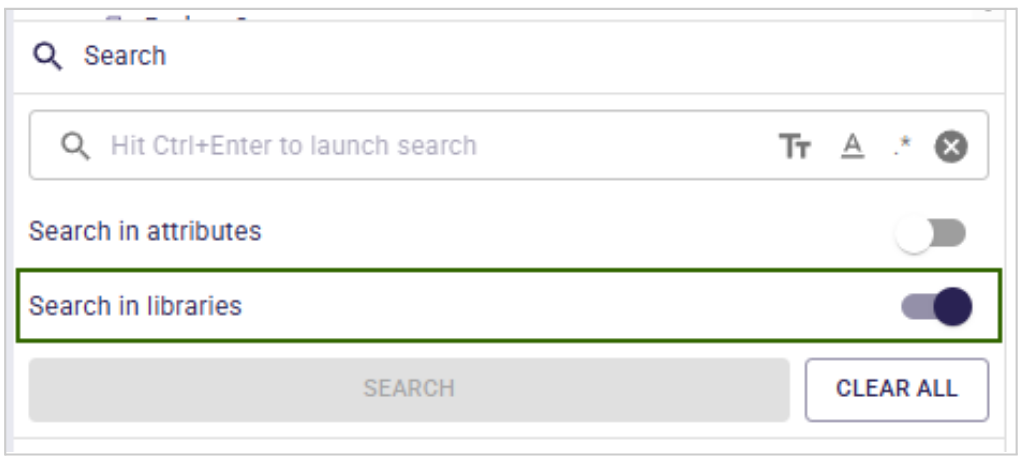
- Added support for excluding libraries in the Search view:
- A new toggle allows including or excluding elements from standard and user libraries.
- Disabled by default for more focused search results.
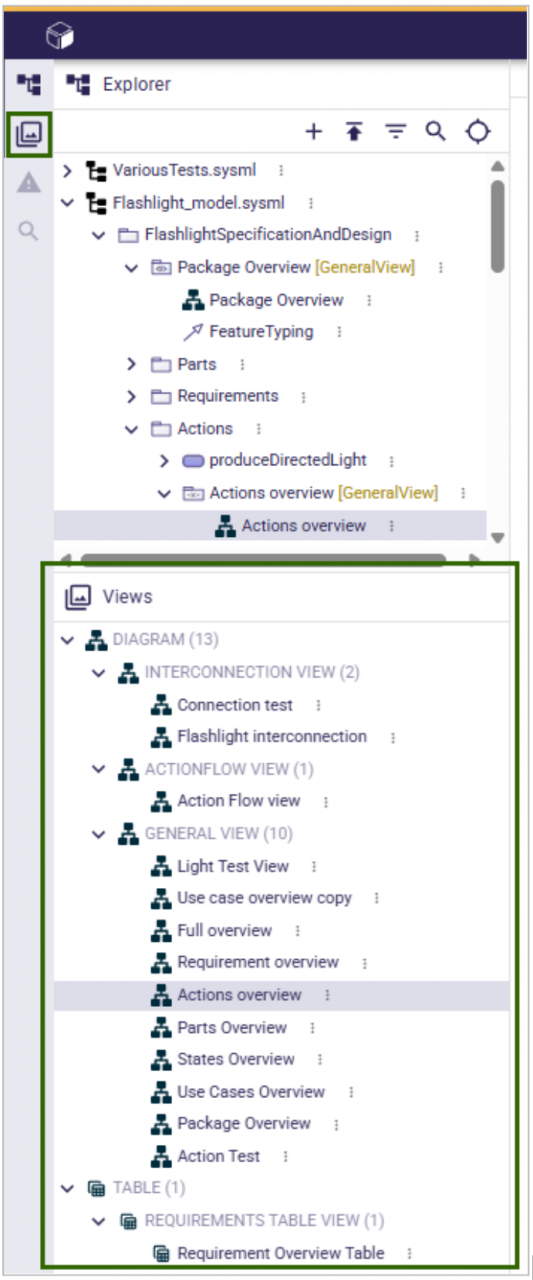
- A new panel on the left-hand side displays the different Views, improving navigation:
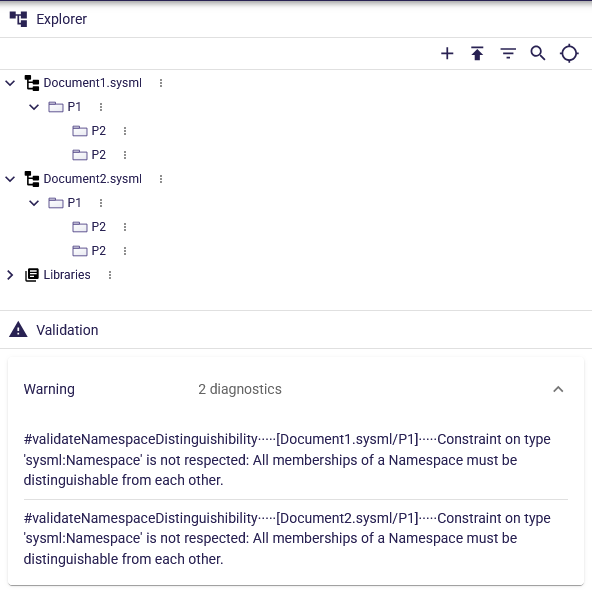
- The Validation view has been improved:
- Clearer labels and better ordering of results.
- Easier identification of which document and element violate rules.
Scalability and Customization Improvements
SysON is extensible by nature. This release also introduces new capabilities that leverage the extensibility of Sirius Web to improve scalability and customization.
- Cross-Project Search with Elasticsearch
SysON can now be connected with Elasticsearch to enable efficient cross-project search.
Unlike the default indexing mechanism provided by Sirius Web, this integration uses a dedicated indexing strategy designed specifically for SysON. This approach brings several key benefits:
- Compact indices to reduce storage overhead
- Optimized data structures for faster and more relevant search results
- Cross-project querying, allowing users to search seamlessly across multiple models
Comprehensive documentation is available to guide you through setting up Elasticsearch, understanding how model elements are mapped to index documents and writing optimized search queries.
- Customizable Validation Rules
Validation is now more flexible and extensible for downstream applications which could:
- Select which SysML validation rules to apply by implementing the
ISysMLValidationRulesProviderinterface - Introduce custom validation logic by providing additional
ISysMLValidationRuleinstances
This makes it easier to tailor validation behavior to specific project requirements, enforce domain-specific constraints, and integrate seamlessly with existing toolchains.
Final Thoughts
This new release emphasizes precision, consistency, and overall user experience. Whether you're working graphically or textually, these improvements aim to make modeling smoother, more predictable, and better aligned with standards so stay tuned for further great evolutions.